



The New Era of Classroom Learning
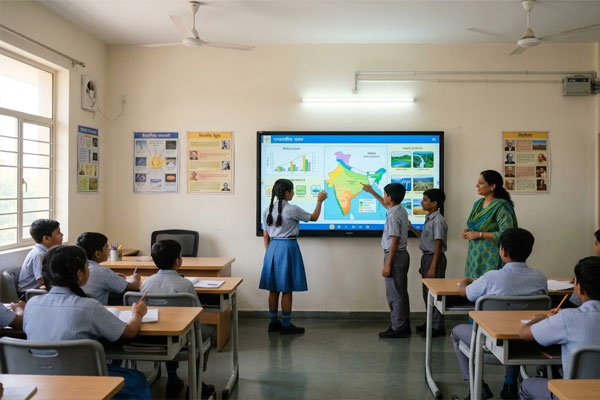
Interactive Flat Panel Displays are transforming classroom learning in India by making teaching more visual, interactive, and easy to understand. In 2026, schools, colleges, coaching classes, and training institutes are using interactive flat panels for smart teaching, digital writing, video lessons, quizzes, online learning, and better student participation.
These displays help teachers explain difficult topics with images, videos, diagrams, presentations, and real-time notes. For Indian classrooms, interactive flat panel displays are becoming a better solution than traditional blackboards, whiteboards, and projectors because they support modern digital learning in one screen.
Classrooms are changing fast. Traditional blackboards and whiteboards are no longer enough. In 2026, schools and colleges in India are adopting interactive flat panel displays (IFPDs) to make learning more engaging and effective.
Key Benefits of Interactive Flat Panel Displays
Interactive flat panel displays bring many advantages to schools and colleges:
Engaging Lessons: Videos, slides, and interactive content make lessons more exciting.
Better Student Participation: Students can answer questions, draw, or interact with the board.
Visual Learning: Complex topics become easier with charts, diagrams, and animations.
Easy to Update: Teachers can add new content anytime without printing
Durable and Long-Lasting: High-quality screens last for years and handle daily classroom use.
Supports Hybrid Learning: Can connect to computers and online platforms for remote classes.
Applications in Schools
Applications in Colleges
Colleges benefit from interactive flat panel displays too:
- Lecture Halls: Show complex diagrams, animations, or real-time data.
- Computer Labs: Teach coding, simulations, or software skills interactively.
- Seminars & Workshops: Conduct interactive sessions for students.
- Project Presentations: Students can present work directly on the screen.
- Administrative Offices: Display notices, schedules, and event information digitally.
Problem-Solving Tip:
Many college students struggle with visualizing complex concepts. Interactive displays make it easier to explain ideas and improve understanding.
Choosing the Right Interactive Display
When selecting an interactive flat panel display for schools or colleges, consider:
- Size: Match the classroom or lecture hall size.
- Resolution: Full HD or 4K for clear visibility.
- Touch Support: Multi-touch screens allow multiple students to interact at once.
- Connectivity: Should support computers, USB, HDMI, and Wi-Fi.
- Accessories: Stylus pens, remote control, and wall mounts.
- Local Supplier: Look for reliable suppliers in Ahmedabad, Gujarat, or India to ensure support and installation.
Traditional Board vs Projector vs Interactive Flat Panel Display
| Feature | Traditional Board | Projector | Interactive Flat Panel Display |
|---|---|---|---|
| Writing | Chalk or marker writing | Not suitable for direct writing | Digital writing and touch support |
| Visual Learning | Limited | Good for presentation | Best for videos, images, diagrams and apps |
| Student Engagement | Low to medium | Medium | High |
| Online Class Support | No | Limited | Yes |
| Maintenance | Chalk/marker cleaning needed | Lamp and alignment issues | Easy to clean and maintain |
| Best For | Basic teaching | Presentation display | Smart classroom learning |
Interactive Flat Panel Display Supplier in Ahmedabad, Gujarat
Elora Board Works provides interactive flat panel display solutions for schools, colleges, coaching classes, training institutes, offices, conference rooms, and smart classrooms in Ahmedabad, Gujarat, and across India. We help customers choose the right display size, classroom setup, and installation solution as per their teaching and presentation needs.
If you are planning to upgrade your classroom with a smart digital board, interactive flat panel display, or modern classroom display solution, Elora Board Works can support you with suitable options for educational and professional spaces.
Maintenance Tips
To keep your display working well:
- Clean the screen with a microfiber cloth.
- Avoid using harsh chemicals.
- Keep the software updated for new features.
- Protect the screen from dust and direct sunlight.
FAQ
Yes, they can be used from primary school to college level.
Yes, multi-touch screens allow many students to participate together.
Absolutely, they can connect to computers and online platforms.
With proper care, most last 7–10 years.
Yes, local suppliers provide installation and training for teachers.