




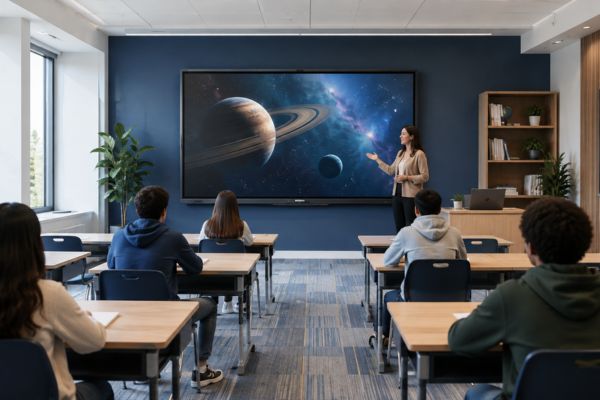
How to Choose Interactive Flat Panel Size Based on Classroom Seating
Choosing the right Interactive Flat Panel Display size is important for a smart classroom. The biggest screen is not always the best choice. A panel should match the classroom seating layout, number of rows, viewing distance, wall space, and teaching style.
A small display can make text difficult to read for students sitting at the back. At the same time, installing a very large panel in a compact classroom may increase cost without giving much extra benefit.
Schools, colleges, coaching centres, and training institutes should therefore select an interactive panel based on where students actually sit and how far they are from the screen.
What Is an Interactive Flat Panel Display?
An Interactive Flat Panel Display is a large digital touchscreen used for teaching and presentations. Teachers can write directly on the screen, show videos, open PDFs, explain diagrams, and share content from laptops or other devices.
It can combine several classroom tools, including:
- Digital whiteboard
- Touchscreen
- Presentation display
- Multimedia screen
- Annotation tool
- Wireless screen sharing
- Digital teaching platform
Instead of drawing guide lines again and again, teachers can use the existing grid as a reference.
Why Classroom Seating Matters When Choosing Panel Size
The number of students alone does not tell you which panel size to buy.
For example, two classrooms may both have 30 students.
One classroom may have:
- 5 rows
- 6 students in each row
- Short distance to the screen
Another classroom may have:
- 10 rows
- 3 students in each row
- Long distance to the screen
Main Factors to Check Before Choosing Interactive Flat Panel Size
Before selecting a display, measure the classroom carefully.
Important factors include:
- Number of student seats
- Number of seating rows
- Distance between each row
- Distance from panel to first row
- Distance from panel to last row
- Classroom width
- Classroom length
- Available wall space
- Student age
- Type of teaching content
Quick Interactive Flat Panel Size Guide
| Classroom Seating | Suggested Panel Size | Best Use |
|---|---|---|
| 15–25 Students | 65 Inch | Small classrooms |
| 25–40 Students | 75 Inch | Standard classrooms |
| 40+ Students | 86 Inch | Large classrooms |
| Long Classroom | 75 or 86 Inch | Better back-row visibility |
| Small Training Room | 65 Inch | Close viewing |
| Large Lecture Room | 86 Inch | Large groups |
65 Inch Interactive Flat Panel for Compact Seating
A 65 Inch Interactive Flat Panel can be suitable when students sit close to the front wall and the classroom has fewer rows.
It works well where there is limited space but teachers still need digital writing, videos, diagrams, and presentations.
Best Seating Layout
A 65-inch panel may work well with:
- 3 to 5 seating rows
- Around 15 to 25 students
- Short classroom depth
- Compact desk arrangement
Suitable For
- Primary schools
- Small coaching classes
- Tutorial rooms
- Language labs
- Training rooms
- Small college classrooms
Benefits
- Requires less wall space
- Lower purchase cost
- Easy for teachers to reach
- Suitable for close viewing
- Good for small groups
When 65 Inch May Be Too Small
A 65-inch panel may not be ideal if:
- Students sit far from the display
- The classroom has many rows
- More than 30 students regularly attend
- Teachers display detailed diagrams
- Small text is frequently shown
- Students need to read spreadsheets or technical drawings
In these cases, a 75 or 86-inch display may provide better visibility.
75 Inch Interactive Flat Panel for Standard Classroom Seating
A 75 Inch Interactive Flat Panel is a strong option for many normal school classrooms.
It provides a larger viewing area than a 65-inch panel while still fitting comfortably on many classroom walls.
Best Seating Layout
A 75-inch panel may suit:
- 5 to 7 seating rows
- Around 25 to 40 students
- Medium-size classrooms
- Standard school desk arrangements
Suitable For
- Secondary schools
- Higher secondary classrooms
- Colleges
- Coaching institutes
- Training centres
- Computer learning rooms
Why 75 Inch Works Well for Many Classrooms
A 75-inch panel provides a good balance of:
- Visibility
- Cost
- Wall space
- Digital writing area
- Back-row readability
86 Inch Interactive Flat Panel for Large Seating Capacity
An 86 Inch Interactive Flat Panel is useful for large classrooms where students sit farther from the front wall.
The larger display provides more writing space and makes content easier to see from distant rows.
Best Seating Layout
An 86-inch display may suit:
- 7 or more seating rows
- 40 or more students
- Large classrooms
- Long lecture rooms
- Wide training halls
Suitable For
- Colleges
- Universities
- Large coaching classes
- Training halls
- Senior school classrooms
- Seminar rooms
Benefits of an 86 Inch Interactive Flat Panel
- Better last-row visibility
- Larger digital writing area
- Easier viewing of diagrams
- Better for maps and graphs
- Suitable for large groups
- Useful for technical subjects
It can be especially helpful when teachers display:
- Engineering diagrams
- Mathematical formulas
- Science illustrations
- Maps
- Charts
- Spreadsheets
- Technical drawings
How to Measure Classroom Seating Distance
Before buying an interactive panel, measure the room from the front display wall to the last student seat.
Step 1: Measure First Row Distance
Check how far the first row sits from the panel.
Students should not sit extremely close to a large display.
Step 2: Measure Last Row Distance
This is one of the most important measurements.
A longer distance generally requires a larger display.
Step 3: Count Seating Rows
More rows usually mean students at the back are farther away.
Step 4: Check Row Spacing
Large gaps between desks can increase the total viewing distance.
Step 5: Check Sight Lines
Make sure the heads of students in front do not block the display for students sitting behind.
Long Classroom vs Wide Classroom
The same panel may perform differently in different room shapes.
Long Classroom
The main problem is distance.
Students at the back need larger text.
A 75 or 86-inch panel may be better.
Wide Classroom
The main problem is viewing angle.
Even a large display may be difficult to see if students sit far to the side.
In such cases, seating arrangement may need improvement.
Step 4: Check Row Spacing
Large gaps between desks can increase the total viewing distance.
Step 5: Check Sight Lines
Make sure the heads of students in front do not block the display for students sitting behind.
Why Text Size Matters
A large screen does not automatically make every lesson readable.
Teachers should also use suitable content design.
For better visibility:
- Use large fonts
- Avoid long paragraphs
- Use short bullet points
- Use clear diagrams
- Use high contrast
- Avoid overcrowded slides
Installation Height Based on Seating
Even the correct panel size can perform poorly if installed at the wrong height.
If the panel is too low:
- Front-row students may block the view
- Desks may hide part of the screen
If it is too high:
- Teachers may struggle to reach the top
- Young students cannot interact comfortably
Installation height should balance:
- Student visibility
- Teacher reach
- Student age
- Classroom furniture height
Wall Space Required for Interactive Flat Panels
Before buying, check whether the classroom wall has enough clear space.
Consider:
- Display width
- Mounting bracket
- Side clearance
- Power socket
- Data cables
- Maintenance access
- Nearby windows
- Existing whiteboards
Should the Whiteboard Be Removed?
Not always.
Many schools keep a traditional whiteboard beside an Interactive Flat Panel Display.
A whiteboard remains useful for:
- Quick notes
- Homework
- Daily announcements
- Temporary calculations
- Backup during power interruptions
Wall Mount or Mobile Stand Based on Seating
Interactive Flat Panels can be wall-mounted or installed on a mobile trolley.
Wall Mount
Best when classroom seating is fixed.
Advantages include:
- Stable position
- Saves floor space
- Clean installation
- Consistent viewing angle
Mobile Stand
Useful when seating layouts change regularly.
Benefits include:
- Easy repositioning
- Can move between rooms
- Useful for training spaces
- Flexible classroom setup
Classroom Lighting and Seating Position
Students should be able to see the panel without heavy glare.
Check where light enters the classroom.
Avoid placing the display directly opposite:
- Large windows
- Strong sunlight
- Powerful lights
Students sitting at side angles may notice reflections more than students sitting in the centre.
Curtains, blinds, or adjusted lighting can improve screen visibility.
Why Viewing Distance Is More Important Than Buying the Largest Panel
Buying an 86-inch panel for every classroom may seem future-ready, but it can increase project cost.
A better approach is to match screen size to room type.
For example:
| Room Type | Seating | Panel |
|---|---|---|
| Small Classroom | 20 Students | 65 Inch |
| Standard Classroom | 35 Students | 75 Inch |
| Large Classroom | 50 Students | 86 Inch |
Planning Interactive Panels for an Entire School
Schools upgrading many classrooms should first divide rooms into categories.
Category A Small Rooms
Use 65-inch panels where viewing distances are short.
Category B Standard Rooms
Use 75-inch displays for normal classrooms.
Category C Large Rooms
Use 86-inch displays where students sit farther away.
Category D Auditorium
Evaluate larger display or projection solutions separately.
Interactive Flat Panel Features Beyond Screen Size
Do not focus only on inches.
Schools should also check:
- 4K resolution
- Touch accuracy
- Multi-touch support
- Writing response
- HDMI ports
- USB connectivity
- Wi-Fi
- Bluetooth
- Wireless screen sharing
- Built-in speakers
- Operating system
- OPS computer option
- Warranty
- Installation
- Teacher training
The right screen size is important, but daily usability is equally important.
Interactive Flat Panel Selection Checklist
Before requesting a quotation, collect:
- Classroom length
- Classroom width
- Number of seats
- Number of rows
- First-row distance
- Last-row distance
- Available wall width
- Student age group
- Required panel quantity
- Mounting preference
- Teaching applications
This information can help the supplier recommend the right panel size.
Conclusion
Choosing the correct Interactive Flat Panel Display should begin with classroom seating, not screen size alone.
A 65-inch panel may be suitable for small classrooms with fewer rows and shorter viewing distances. A 75-inch panel is a balanced choice for many standard classrooms. An 86-inch panel is more suitable for large classrooms where students sit farther from the screen.
Schools should measure the room, count seating rows, check the last-row viewing distance, review wall space, and consider the type of content teachers will display.
The best Interactive Flat Panel is the one that allows every student to see the lesson clearly and every teacher to use the display comfortably.
Frequently Asked Questions
Measure the room, count the number of seating rows, and check the distance between the display and the last row before selecting the panel size.
Yes. A 65-inch panel can work well for small classrooms where students sit relatively close to the screen.
A 75-inch display is suitable for many medium-sized classrooms with around 25 to 40 students and a moderate viewing distance.
Yes. An 86-inch display is useful for large classrooms, lecture rooms, and training spaces where students sit farther from the front.
No. Seating rows and last-row viewing distance are often more important than the total number of students.
A 75-inch panel is often a practical starting point, but the final choice should depend on classroom length and seating arrangement.