




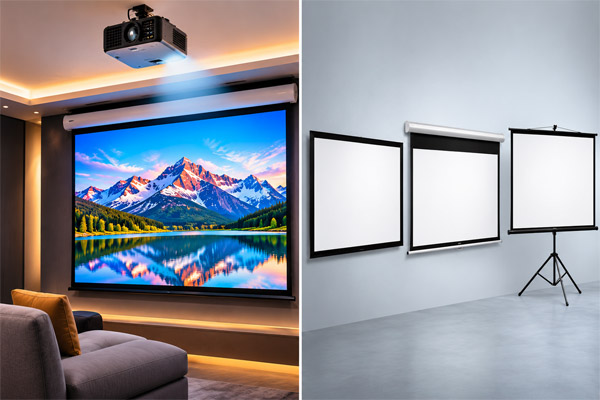
How to Select the Right Projection Screen
A projector can display a large image, but the screen you choose also affects how clearly your audience sees it. Screen size, room lighting, seating distance and installation space all play a part in creating a comfortable viewing experience.
To select the right projection screen, start with the room and the projector’s specifications. Choose a screen size that fits the available wall and can be seen from the back of the room. Then check the projector’s aspect ratio, throw distance and brightness before deciding on the screen type and surface.
Whether you are setting up a classroom, office meeting room, training centre or auditorium, a little planning can help you create a projection system that suits the space.
Why Does the Projection Screen Matter?
A projection screen provides a flat surface designed to display the image from a projector. It can help present text, images and videos more consistently than an uneven or coloured wall.
The right screen also helps you make better use of the room. For example, a screen that is too small may make text difficult to read from the back. A screen that is too large for the projector or space may result in a dim image or an uncomfortable viewing position.
Choose the Right Projection Screen Size
The right screen size depends on the room dimensions, the type of content and where the audience will sit.
For a classroom or meeting room, check whether people at the back can comfortably read the smallest text you expect to display. Also make sure the screen fits within the available wall area without being blocked by furniture, lights or doors.
Before selecting a size, consider:
- The width and height of the available wall
- The distance between the screen and the audience
- The distance between the projector and the screen
- The height at which the screen will be installed
- Whether you will show presentations, videos or detailed drawings
Tip: Screen sizes are commonly stated as a diagonal measurement. Check the actual screen width and height before ordering.
Match the Screen Aspect Ratio to Your Projector
The aspect ratio describes the relationship between the width and height of the projected image. Choosing a screen that matches your projector’s native aspect ratio helps the image fit the screen properly.
| Aspect ratio | Common use | Suitable for |
|---|---|---|
| 4:3 | Traditional presentation formats | Older projectors and some classroom presentations |
| 16:10 | Widescreen presentations | Classrooms, offices and computer content |
| 16:9 | Widescreen video | Full HD content, videos and home entertainment |
A projector can display content in a different aspect ratio, but you may see unused areas or black bars on the screen. Check both the projector’s native resolution and the content you use most often before choosing.
Check the Projector Throw Distance
Throw distance is the distance between the projector lens and the screen. It determines how large an image a projector can produce from a particular position.
Each projector has a specified throw ratio or range. Before finalising your screen size, check the projector manufacturer’s specifications or use its throw distance calculator. This will help you confirm that the projector can fill the screen from the available mounting position.
For a small classroom or meeting room, a short-throw projector may be useful when there is limited distance between the projector and the screen. For a larger hall, a standard-throw projector may provide more placement flexibility, depending on the model.
Consider Room Lighting and Screen Surface
Room lighting affects how bright and clear a projected image appears. Windows, ceiling lights and daylight can make the image look less distinct, especially when the projector is not bright enough for the conditions.
A matte white screen is a common choice for classrooms and meeting rooms because it provides a broad viewing angle. Other surfaces may be suitable for specific lighting or seating requirements.
When comparing screen surfaces, consider:
- How much light enters the room
- Whether curtains or blinds are available
- The brightness of the projector
- How far the audience sits from the screen
- Whether viewers sit directly in front or at wide angles
Ask your projector supplier to recommend a screen surface based on the actual room and projector model.
Understand Projection Screen Gain
Screen gain describes how a screen reflects light compared with a standard reference surface. A higher-gain screen can make the image appear brighter for viewers near the centre, but brightness may decrease for people seated at wider angles.
A lower or standard-gain surface may provide a more even view across a wider seating area. The right choice depends on projector brightness, room lighting and audience layout.
For a classroom where students sit across the room, viewing angle can be just as important as brightness. For a meeting room with a smaller group seated near the centre, the requirements may be different.
Compare Different Types of Projection Screens
Projection screens are available in different designs for fixed and portable setups.
| Screen type | How it works | Suitable for |
|---|---|---|
| Tripod projection screen | Mounted on a portable stand | Training sessions and rooms where the screen needs to be moved |
| Manual pull-down screen | Pulled down when needed and rolled up after use | Classrooms, offices and meeting rooms |
| Motorised projection screen | Opens and closes using a motor | Conference rooms, auditoriums and permanent installations |
| Fixed-frame screen | Remains stretched on a wall-mounted frame | Dedicated rooms where the screen stays in place |
Elora Board offers
projection screens
for different spaces, including tripod and motorised options. The best choice depends on how often the screen will be used and whether it needs to be moved or stored.
Plan the Screen Installation Height
The screen should be positioned so the audience can see the complete image without straining. If it is too low, people in front may block the view. If it is too high, viewers may need to look upward for long periods.
For classrooms, consider the height of desks and the position of the teacher. In an office, check whether a conference table or chairs could block the lower part of the screen.
Also allow enough clearance for a pull-down or motorised screen to open fully. The mounting surface should be suitable for the screen’s size and weight.
Check Compatibility With Projector Accessories
A complete projection setup may need more than a projector and screen. Depending on the room, you may also need a ceiling mount, wall mount, cables or other accessories.
Before installation, check:
- Whether the projector mount supports the projector’s weight
- Whether the projector can be positioned at the required distance
- Whether the cables can reach the connected devices
- Whether power points are available near the installation area
- Whether the projected image can be aligned with the screen
Elora Board supplies projectors along with screens and accessories for educational and professional spaces.
Common Mistakes to Avoid When Choosing a Projection Screen
A few checks before purchase can prevent problems during installation:
Choosing only by diagonal size: Confirm the screen’s actual width and height as well.
Ignoring the projector’s aspect ratio: A mismatch can leave unused areas on the screen.
Overlooking throw distance: Check that the projector can fill the selected screen from its planned position.
Ignoring room lighting: Consider both the projector’s brightness and the screen surface.
Forgetting audience visibility: Make sure people at the back and sides can see the image.
Leaving installation until the end: Plan mounting, cable routes and power access before ordering.
Frequently Asked Questions
Yes. A projector can display an image on a suitable plain wall. However, wall colour, texture and unevenness can affect the image. A projection screen provides a surface designed for viewing projected content.
A manual pull-down or fixed screen can suit a classroom with a permanent setup. A tripod screen may be useful when the screen needs to move between rooms. The size and surface should match the projector, seating layout and lighting.
No. The screen should fit the room and work with the projector’s brightness and throw distance. It should also allow viewers to read the content comfortably from their seats.
Yes, but a 4:3 image will not fill the entire 16:9 screen without cropping or stretching. Matching the screen to the projector’s native aspect ratio usually provides a better fit.
A tripod projection screen is designed for portable use. It can be a practical option for training sessions, temporary presentations and shared spaces.
Check the projector’s throw ratio or use the manufacturer’s throw distance calculator. Enter the desired screen size and compare the required distance with the space available in your room.
A manual screen is operated by hand, while a motorised screen opens and closes using a motor. Consider how often the screen will be used, where it will be installed and which operating method suits your room.
Find a Projection Screen for Your Space
The right projection screen should work with your projector, fit your room and give your audience a clear view. Checking screen size, aspect ratio, throw distance and lighting before purchase can help you create a more effective setup.
Elora Board Works supplies projectors, projection screens and accessories for classrooms, offices, training centres and other spaces in Ahmedabad, Gujarat and across India.
Looking for a screen for your projector? Contact Elora Board Works with your room dimensions and projector details to discuss a suitable option.