



How to Choose the Right ViewSonic Projector for Classroom and Office Use
Choosing the right projector is important for creating a better learning and presentation experience. Whether you need a projector for a school classroom, coaching institute, meeting room, training centre, or corporate office, the right model should provide clear visuals, suitable brightness, easy connectivity, and reliable performance.
A ViewSonic Projector can be used for educational presentations, business meetings, videos, training sessions, and smart classroom applications. But not every projector is suitable for every room.
The right choice depends on room size, brightness, resolution, connectivity, screen size, installation, and daily usage.
In this guide, we explain how to choose the right ViewSonic Projector for classroom and office use and what factors you should check before buying.
What Is a ViewSonic Projector?
A ViewSonic Projector is a digital projection device used to display presentations, videos, educational material, images, charts, and other visual content on a larger screen.
ViewSonic projectors are available in different brightness levels, resolutions, and technologies depending on the model.
They can be used in:
- Schools
- Colleges
- Coaching centres
- Training institutes
- Corporate offices
- Conference rooms
- Meeting rooms
- Auditoriums
- Seminar halls
- Presentation areas
For classrooms and offices, projectors help make information easier to understand by displaying content on a larger screen.
Why Are ViewSonic Projectors Useful?
A laptop or desktop screen may be enough for one or two people, but it becomes difficult when a larger group needs to view the same content.
A projector solves this problem by displaying the content on a bigger screen.
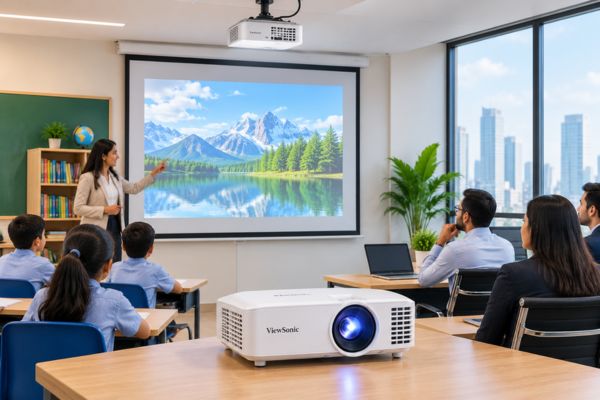
A ViewSonic Projector for Classroom can help teachers display educational videos, diagrams, presentations, maps, and digital lessons.
In offices, projectors can support meetings, employee training, presentations, product demonstrations, and business discussions.
Some key benefits include:
- Large screen viewing
- Better presentation visibility
- Easy content sharing
- Useful for group learning
- Suitable for training sessions
- Supports multimedia content
- Better engagement during presentations
How to Choose the Right ViewSonic Projector
Before buying a projector, do not choose only based on price.
Check how and where the projector will be used.
Here are the most important factors to consider.
1. Check the Room Size
The size of the room should be one of the first factors you consider.
A projector suitable for a small office meeting room may not provide the same performance in a large classroom or auditorium.
Before buying, check:
- Room length
- Room width
- Seating capacity
- Distance between screen and projector
- Number of viewers
- Amount of natural light
For small rooms, a standard projector may be enough.
For larger classrooms or conference halls, you may need higher brightness and a larger projected image.
2. Choose the Right Brightness
Projector brightness is generally measured in lumens.
Brightness determines how clearly the image can be seen, especially when the room has lights or windows.
For example:
- A darker room may work with lower brightness.
- A regular classroom may require moderate brightness.
- A bright office or conference room may need higher brightness.
- A large auditorium may require a more powerful projector.
When choosing a ViewSonic Projector, always consider the lighting conditions of the room.
Higher brightness can be helpful if you do not want to switch off all the lights during a presentation.
3. Select the Right Resolution
Resolution affects image sharpness and text clarity.
A projector with better resolution can display smaller text, charts, images, and videos more clearly.
Common projector resolutions include:
SVGA
Suitable for basic presentations and simple educational applications.
XGA
Can be useful for classrooms, offices, and standard presentations.
Full HD
A practical choice for modern classrooms, corporate meetings, training videos, and multimedia presentations.
4K
Suitable for high-detail presentations, large screens, premium conference rooms, and high-resolution visual content.
For most schools and offices, Full HD can provide a good balance between quality and practical usage.
4. Consider Classroom Usage
A projector used in a school should be easy for teachers to operate every day.
Teachers may use the projector for:
- PowerPoint presentations
- Educational videos
- Digital textbooks
- Online learning
- Charts and graphs
- Science diagrams
- Maps
- Recorded lessons
A ViewSonic Projector for Smart Classroom should provide clear visuals and simple connectivity.
Schools should also consider daily usage hours because the projector may be used for several classes throughout the day.
ViewSonic Projector for Schools
Schools are increasingly using digital content to make lessons more engaging.
A ViewSonic Projector for School can help teachers explain difficult topics using visuals.
It can be useful for:
- Mathematics lessons
- Science demonstrations
- Geography maps
- Educational videos
- Language learning
- Digital presentations
- Online classes
- Training sessions
For schools, easy operation and reliable daily performance should be important selection factors.
ViewSonic Projector for Offices
Projectors are also useful in professional environments where teams regularly present information.
A ViewSonic Projector for Office can be used for internal meetings, client presentations, training programmes, and planning sessions.
Office buyers should focus on:
- Clear text
- Good brightness
- Laptop compatibility
- Easy setup
- Suitable resolution
- Reliable operation
For offices with several meeting rooms, different projector models can be selected according to room size.
ViewSonic Projector vs Interactive Flat Panel
Both projectors and interactive flat panels are useful for education and business environments.
However, they serve slightly different requirements.
| Feature | ViewSonic Projector | Interactive Flat Panel |
|---|---|---|
| Display Size | Can create very large images | Limited to panel size |
| Screen Required | Usually yes | No |
| Portability | Possible | Usually limited |
| Touch Interaction | Depends on setup | Usually available |
| Auditorium Use | Suitable | Less practical for very large areas |
| Classroom Use | Suitable | Suitable |
| Office Presentations | Suitable | Suitable |
A projector may be more useful when you need a very large display.
An interactive panel may be better when touch-based interaction is a priority.
What Size ViewSonic Projector Should You Choose?
There is no single projector specification suitable for every classroom or office.
The right choice depends on:
- Room dimensions
- Lighting conditions
- Number of viewers
- Projection distance
- Screen size
- Type of content
- Daily usage
For example, a classroom with 40 students may need a brighter projector than a meeting room for eight employees.
Instead of selecting only by price, discuss the room requirement with the supplier.
What Should Schools Check Before Buying?
Schools purchasing projectors should check:
- Brightness
- Resolution
- Connectivity
- Screen compatibility
- Installation method
- Lamp life
- Maintenance
- Warranty
- Service support
- Daily usage capacity
If several classrooms have similar layouts, using similar projector setups can also make operation easier for teachers.
What Should Offices Check Before Buying?
Office buyers should consider:
- Meeting room size
- Number of viewers
- Presentation type
- Laptop connectivity
- Resolution
- Brightness
- Screen size
- Installation
- Maintenance
- Service support
If employees use different laptops, make sure the projector supports the required input options.
Why Installation Matters
Even a good projector may not perform properly if installation is incorrect.
Incorrect placement can cause:
- Distorted images
- Small screen size
- Poor viewing angle
- Shadows
- Cable problems
- Uncomfortable viewing
Professional installation can help position the projector correctly according to the room and screen.
What to Check Before Buying a ViewSonic Projector
Before placing an order, confirm the complete specifications.
Check:
- Projector brightness
- Resolution
- Projection technology
- Screen size
- Throw distance
- HDMI and other ports
- Wireless connectivity
- Installation options
- Lamp or light-source life
- Warranty
- Service availability
- Required accessories
Also explain your application clearly to the supplier.
Instead of simply asking for a projector, mention whether you need it for a school, college, coaching centre, corporate office, meeting room, or training centre.
How to Choose a ViewSonic Projector Supplier
The supplier you select can affect product selection, installation, and after-sales support.
When choosing a ViewSonic Projector Supplier, look for a company that can help with:
- Projector selection
- Screen selection
- Mounting solutions
- Cables and accessories
- Installation
- Technical guidance
- Warranty support
- After-sales service
Do not select only according to the lowest price.
A correctly selected projector can provide better long-term value than a cheaper model that does not match your room requirements.
ViewSonic Projector Supplier in Ahmedabad
For schools, colleges, coaching institutes, offices, and training centres in Ahmedabad, buying from a local supplier can make selection and installation easier.
Elora Board Works provides ViewSonic projector solutions along with projection screens and related accessories for educational and corporate applications.
Customers in Ahmedabad and Gujarat can discuss their room size, audience capacity, screen requirements, and usage before choosing a projector.
This helps in selecting a projector that matches the actual application rather than buying only based on specifications.
Is a ViewSonic Projector Worth Buying?
A ViewSonic projector can be a practical option when you need a large display for educational or professional use.
It may be useful when:
- You conduct regular presentations
- Teachers use digital learning material
- Employees attend training sessions
- You require a large projected display
- Multiple people need to view the same content
- You need Full HD or higher-resolution options
- You want flexible classroom or office presentation solutions
The right projector should match the size and lighting of your room.
Conclusion
Choosing the right ViewSonic Projector for classroom and office use is not only about selecting the highest brightness or resolution.
You should consider room size, lighting, audience size, screen dimensions, connectivity, resolution, installation, maintenance, and daily usage.
Schools should focus on clear visibility, easy operation, and reliable performance. Offices should focus on professional image quality, connectivity, and presentation convenience.
If you are looking for a ViewSonic Projector Supplier in Ahmedabad, explain your room size, application, screen requirement, and expected usage before purchasing.
A properly selected projector can make classroom teaching more engaging and office presentations more effective.
Frequently Asked Questions
A ViewSonic projector can be used for classroom teaching, office presentations, employee training, videos, meetings, seminars, conferences, and other multimedia applications.
Yes. ViewSonic projectors can be used in schools, colleges, coaching centres, and training institutes for digital lessons, presentations, videos, and educational content.
The required brightness depends on classroom size, screen size, and lighting conditions. Brighter classrooms generally require a projector with higher lumen output.
Yes. Full HD can provide clear text, images, presentations, and videos for many classrooms, offices, and training rooms.
Yes. Depending on the model, ViewSonic projectors may provide HDMI, VGA, USB, or wireless connectivity for laptops and other devices.
Both can be suitable. DLP projectors can provide sharp images and good contrast, while LED projectors may offer longer light-source life and lower maintenance.
A projector can sometimes be used on a plain wall, but a proper projection screen usually provides a cleaner and more professional viewing surface.
Many projector models can be installed using suitable ceiling mounting solutions. Always confirm compatibility with the selected model.
Check brightness, resolution, room size, screen size, connectivity, lamp life, installation requirements, warranty, and after-sales service.
You can purchase through a projector and presentation solution supplier in Ahmedabad. Elora Board Works provides projector solutions, projection screens, and related accessories for educational and corporate requirements.